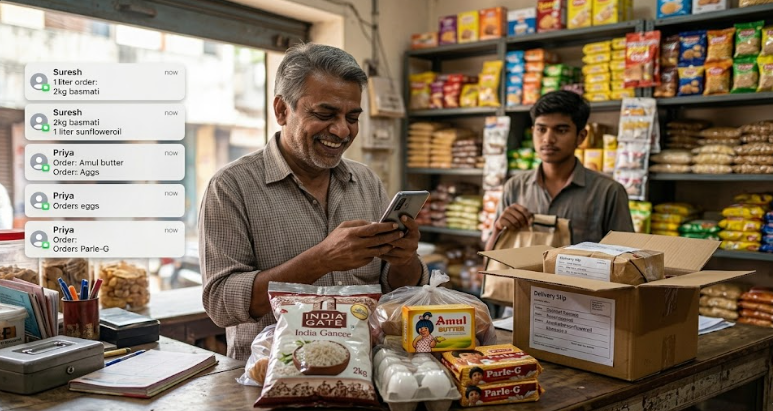
WhatsApp Business Marketing for Indian Shop Owners: Get More Orders Every Day (2026 Guide)

WhatsApp Business Marketing for Indian Shop Owners: Get More Orders Every Day (2026 Guide)
Here is a fact that surprises many people: India has over 500 million active WhatsApp users. That is more than the entire population of the United States and Brazil combined. And a huge portion of those users — your neighbours, your customers, the aunty who buys vegetables from you every morning — are active on WhatsApp every single day.
Yet most Indian shop owners still treat WhatsApp purely as a chat app. They send family forwards, argue in colony groups, and maybe occasionally send a photo of new stock to a few regulars. They are sitting on one of the most powerful free marketing tools ever created — and barely using 5% of what it can do.
This guide will change that. You will learn how to use WhatsApp Business to send daily offers, take orders, build a loyal customer list, and grow your shop's revenue — without spending money on ads. Everything here is based on what is actually working for Indian small businesses in 2026.
WhatsApp vs WhatsApp Business: What Is the Difference?
Regular WhatsApp is for personal use. WhatsApp Business is a separate free app designed specifically for small businesses. The key differences:
| Feature | WhatsApp (Personal) | WhatsApp Business |
|---|---|---|
| Business profile with address, hours, website | ❌ | ✅ |
| Product catalogue (show items with price) | ❌ | ✅ |
| Auto-reply when you're busy | ❌ | ✅ |
| Quick replies (save repeated messages) | ❌ | ✅ |
| Broadcast lists (send to 256 at once) | Limited | ✅ |
| Labels to organise customers | ❌ | ✅ |
| Separate business and personal number | ❌ | ✅ |
WhatsApp Business is free to download from the Play Store or App Store. It works on Android and iPhone. You need a phone number for registration — use your shop's dedicated number so you can keep business and personal separate.
Setting Up WhatsApp Business Correctly (Most Shop Owners Skip This)
Most shop owners download the app and stop there. The setup process takes 20 minutes but dramatically affects how professional and trustworthy your business looks to customers.
1. Complete Your Business Profile
Go to Settings → Business Profile and fill in every field:
- Business name: Your shop's actual name as customers know it
- Category: Choose the most accurate category
- Description: 2–3 sentences about what you sell and what makes you special. Include your area/city for local search discoverability.
- Address: Your shop's full address
- Hours: Your actual opening and closing times, including Sunday and holiday schedule
- Email: A business email address
- Website: Your website URL if you have one
2. Set Up Your Catalogue
The WhatsApp Business catalogue is essentially a free mini online store inside WhatsApp. Customers can browse your products, see prices, and enquire — without leaving the app.
To add products: Go to Settings → Catalogue → Add Product.
For each product add:
- A clear photo (white or plain background works best)
- Product name
- Price in ₹
- Short description (what it is, sizes available, material, etc.)
Even adding 10–20 key products makes a significant difference. Customers love being able to see what you have before calling or visiting.
3. Set Up Auto-Replies
Auto-replies ensure no customer enquiry goes unanswered, even at midnight.
Away message (when your shop is closed):
Thank you for contacting [Shop Name]! Our shop hours are [hours]. We will reply as soon as we open. To see our catalogue, tap here: [catalogue link]. For urgent enquiries, call us at [number].
Greeting message (sent to new contacts who message for the first time):
Welcome to [Shop Name]! 👋 How can we help you today? You can browse our products here: [catalogue link]. For orders or enquiries, just send us a message!
4. Create Quick Replies
Quick replies let you save frequently sent messages and send them with a single tap. Set up quick replies for:
- Your price list
- Delivery information
- Payment methods (UPI, cash, card)
- Order confirmation template
- Thank you message after purchase
To create: Settings → Business Tools → Quick Replies → Add. Type "/" in any chat to access your quick replies instantly.
Building Your Customer Broadcast List: The Right Way
A broadcast list lets you send one message to up to 256 customers at once. Each customer receives the message as a personal chat, not a group message. This feels personal and gets much higher open rates than any other marketing channel.
The critical rule: customers must have your number saved in their phone for broadcast messages to be delivered. If they haven't saved your number, they won't receive it.
How to Build Your Broadcast List
- Ask every customer to save your number at the time of purchase. Say: "Please save our number so we can send you offers and updates."
- Put a small sign at your billing counter: "Save our WhatsApp number to receive exclusive offers: [your number]"
- Add your WhatsApp number to all your materials — visiting cards, bills, bags, packaging.
- Ask existing customers to save your number via broadcast — but only to those already in your regular chat list (they must message you first).
How to Organise Your List with Labels
WhatsApp Business lets you label customers. Create labels like:
- New Customer
- Regular Customer
- Bulk Buyer
- Pending Payment
- VIP
You can then send targeted broadcasts to specific labels. For example, send a special discount only to "Regular Customers" — this makes them feel valued and increases loyalty.
What to Send: A 4-Week WhatsApp Marketing Calendar for Indian Shops
The most common question I get from shop owners: "But what do I send? I don't want to spam my customers." The key is to be useful, not just promotional. Follow the 80/20 rule: 80% useful content, 20% offers.
Week 1: New Arrivals + Useful Information
- Monday: New stock photo with price. "New arrivals this week 🎉 [Product] now in stock. Limited quantity. First come first serve."
- Wednesday: A useful tip related to your product. (A kirana store: "Did you know? Rice stored in an airtight container with a bay leaf stays pest-free for months.")
- Friday: Weekend special. "Weekend offer 🛒 [product] at ₹X today and tomorrow only."
Week 2: Social Proof + Offers
- Tuesday: Customer review screenshot (with permission). "Happy customer moment 😊 [customer name] from [area] has been buying from us for 3 years!"
- Thursday: Behind-the-scenes photo or video. How fresh vegetables arrive, how clothes are stitched, how food is prepared. People love seeing this.
- Saturday: Weekend combo deal or bulk discount.
Week 3: Festival/Season-Based
Plan ahead for Indian festivals — Pongal, Holi, Eid, Onam, Navratri, Diwali, Christmas, New Year. Customers actively look for deals before festivals. Send a festival offer message 3–4 days before the festival, a reminder message the day before, and a "last day" message on the morning of the festival.
Week 4: Loyalty + Referral
- Exclusive deal for customers who refer a friend: "Refer a friend to our shop and get ₹50 off your next purchase when they buy from us for the first time."
- A simple "Thank you" message acknowledging loyal customers by name goes a very long way.
WhatsApp Status: Free Advertising That Most Shop Owners Ignore
WhatsApp Status (similar to Instagram Stories) disappears after 24 hours, but it is one of the most underused free marketing tools available. Every contact who has saved your number can see your status update.
Post on WhatsApp Status:
- Daily offers or flash deals
- New product photos
- Customer testimonials
- Behind-the-scenes of your shop
- Festival wishes (with a soft mention of your offers)
Best time to post status: 8–9 AM (when people check phones after waking) and 7–9 PM (evening browsing time). Post daily or at least 4–5 times per week for maximum visibility.
Taking Orders on WhatsApp: How to Make It Smooth
Many Indian shops now take orders entirely through WhatsApp. Here is a simple system that works well:
Create an Order Template
Ask customers to send orders in a standard format:
Name: [Name]
Address: [Full address]
Order: [Product name, quantity]
Delivery time preference: [Date/time]
Payment: [UPI / Cash on delivery]
Send this template as a quick reply so customers know what information to provide. This avoids the back-and-forth of "what address" and "which product" and makes your order processing much faster.
Order Confirmation Message
Always confirm every order immediately with a message like:
✅ Order confirmed! [Product, quantity] will be delivered to [address] on [date/time]. Total: ₹[amount]. Payment via [method]. Thank you for ordering from [Shop Name]!
This simple confirmation reduces cancelled orders and builds trust significantly.
WhatsApp Business vs WhatsApp Business API: Which Do You Need?
The free WhatsApp Business app is perfect for shops with a manageable customer volume (up to 200–300 active customers). If you have a larger operation — multiple staff members handling customer messages, thousands of customers, automated order workflows — you may eventually need the WhatsApp Business API.
API features include: sending messages from multiple devices, CRM integration, automated flows, and unlimited broadcast reach. However, it has a cost and requires a verified business account. For most Indian small shop owners, the free app is more than sufficient to start and scale for the first few years.
WhatsApp Marketing Rules to Follow (Avoid Getting Banned)
WhatsApp has strict policies. Violating them can result in your number being banned — which means losing your entire customer list. Follow these rules:
- Only message people who have agreed to receive messages from you. Never add random numbers to broadcasts.
- Do not send bulk messages using unofficial third-party apps or WhatsApp blasters. These violate WhatsApp's terms and result in permanent bans.
- Give customers an easy way to opt out. End broadcasts with "Reply STOP to unsubscribe from our updates."
- Do not send more than 1–2 broadcast messages per week. Excessive messaging causes people to block you, which signals spam to WhatsApp.
- Never share misleading offers. If you say 50% off, it must actually be 50% off.
Real Example: How a Tirunelveli Sweet Shop Used WhatsApp to Double Festival Sales
A sweet shop owner in Tirunelveli — running a small but well-loved business — had around 180 regular customers in his WhatsApp contact list. Before Diwali 2025, instead of printing flyers (which cost ₹2,000), he did this:
- Updated his WhatsApp Status every day for 10 days before Diwali with photos of special Diwali sweets and prices
- Sent one broadcast message 5 days before: "Pre-order your Diwali sweet boxes now to guarantee delivery. Kaju Katli ₹600/250g, Motichoor Ladoo ₹450/250g, Mixed Box ₹1,100/500g. Last date to order: [date]. Reply to book."
- Sent a reminder broadcast 2 days before: "Only 20 boxes left for pre-order. Reply with your order before tonight."
Result: 47 pre-orders worth ₹52,000 before Diwali even arrived. Zero ad spend. His previous Diwali sales were ₹28,000 with ₹2,000 in flyer expenses. The WhatsApp approach was not only more profitable but also let him plan production in advance.
Frequently Asked Questions
Can I use WhatsApp Business on the same phone as personal WhatsApp?
Yes. As of 2026, WhatsApp allows dual account functionality. You can use both personal WhatsApp and WhatsApp Business on the same phone with different numbers.
What if my customers are not on WhatsApp?
In urban and semi-urban India in 2026, WhatsApp penetration is extremely high. However, if your customer base is primarily elderly or in rural areas with low smartphone usage, combine WhatsApp with traditional methods like phone calls and physical notices.
How do I get my WhatsApp Business number on Google?
Add your WhatsApp Business number to your Google Business Profile (see our guide on GBP setup). Customers can then click your number on Google Maps and it will open directly in WhatsApp.
Is WhatsApp Business safe for payments?
WhatsApp Pay is available in India and allows direct UPI payments within the chat. It is RBI-regulated and safe to use. However, always confirm payment receipt before dispatching orders.
Conclusion: Start with These 3 Actions Today
You do not need to implement everything at once. Start with these three actions today:
- Download WhatsApp Business and complete your business profile fully in the next 30 minutes.
- Add at least 10 products to your catalogue with clear photos and prices this week.
- Ask your next 20 customers to save your WhatsApp number. Build your broadcast list one customer at a time.
WhatsApp is where your customers already are. All you need to do is show up consistently, add value, and watch your orders grow. Start today.
Related Articles
All articles →
Google AdSense Approval in India: Why You Got Rejected and Exactly How to Fix It (2026 Guide)
Getting rejected by Google AdSense in India? Here are the real reasons and step-by-step fixes. Practical checklist for Indian bloggers…
Instagram Marketing for Indian Clothing Boutiques: Get Daily Orders Without Paid Ads (2026 Guide)
How Indian boutique owners use Instagram Reels, Stories, and DMs to get daily orders without spending on ads. Real strategies…
Google Business Profile Setup for Indian Shops: Get Local Customers Free (2026 Guide)
Step-by-step guide to set up Google Business Profile for your shop in India. Get found on Google Maps, attract local…